


Widget 2026: Aesthetic Widgets
4.61.91K Reviews
App Specs
- Version
- 85.1.4
- Updated On
- License
- Free
- Downloads
- 10,000,000+
- Developer
- GeniusTools Labs
- Categories
- Personalization
- Platform
- Android, iOS
Screenshots
 Analysis by AppCompare
I tend to notice my phone’s home screen most when someone else is looking over my shoulder: a family member asking to check the calendar, or a friend borrowing my device to find a photo. That is why I like judging a widget app not only by how attractive it looks, but by whether its visual choices remain practical in a shared setting. Widget 2026: Aesthetic Widgets is a personalization app from GeniusTools Labs, built around making a phone screen feel more individual through widgets and styling.
For a household, the appeal is straightforward: different people can prefer different looks, and a widget can make useful information easier to spot without turning the screen into a wall of icons. I would treat this as a way to personalize one person’s device, rather than a coordination tool for a family. Its value is in presentation; household schedules and account arrangements still need to be managed through the apps people already use.
One screen, several kinds of everyday use
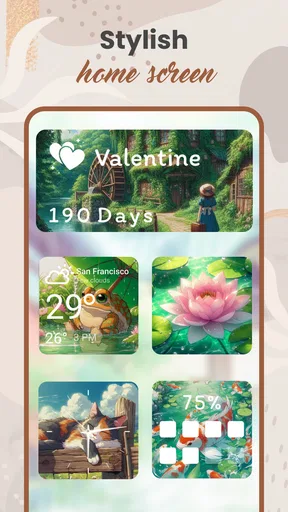
Imagine getting ready in the morning while another person asks what time an appointment is. A calendar-style widget can make a glance at the phone more useful than opening several apps, provided the information is already available through the relevant service. The same idea suits a weather glance before heading out, or a photo-led layout that makes a personal phone feel less generic. Those are ordinary, low-effort reasons to try widgets, not a promise that the app itself organizes a household.
The practical question is whether you want a screen that is expressive as well as useful. If your priority is simply to see a date or forecast in the most direct way, the widgets built into your phone may be enough. If you enjoy matching colors, images, and typography to a particular mood, a dedicated customization app has a clearer purpose. I see this one as a styling layer for people who are willing to spend a little time arranging their screen.
Keep personal boundaries in mind
A shared device calls for more care than a personal one. Before adding a widget that surfaces calendar details or other personal information, I would check which account supplies that information and what a person can read from the home screen without unlocking or opening an app. A decorative photo widget has a different privacy feel from a widget showing appointments, so I would choose based on who can see the screen and what I am comfortable displaying.
That distinction matters especially on a phone used by more than one person. A customized layout does not, by itself, create separate profiles or decide which person owns the information shown. I would not use a visual widget as a substitute for account separation, device-level privacy settings, or the controls in the underlying calendar or weather service. For a child’s device or a shared family phone, those boundaries should be settled first; the aesthetic layer comes afterward.
Coordination without pretending it is family software
Widgets can help people notice information, but they do not automatically keep everyone coordinated. If several household members need the same event details, the source calendar must be set up appropriately before a widget can be useful. My practical approach would be to keep shared plans in the account or service the household already trusts, then use a widget only as a convenient window onto that information. That avoids confusing a attractive home screen with a shared planning system.
Worth Reading Before You Choose

Baby Panda World Brings Quick Play to Modern Phones, but Its Game Library Feels Busy

ESPN’s Live Game View Makes Following Close Games Easier

QuizzLand Review: A Good Fit for Short Trivia Breaks, Not Every Player

Basketball Stars: Multiplayer Is Fast, but Can It Recover When Matches Go Wrong?

WEBTOON Turns Phone Updates Into a Better Reading Routine

Link to Windows Runs on Shared Habits, Not Social Feeds
There is also a useful trade-off between a compact screen and a detailed one. A small, clean design can be easier to scan, while a larger widget may expose more information but take up space that could be used for frequently opened apps. I would start with one widget tied to a real daily habit, use it for a few days, and only then decide whether a second one earns its place. This is a better test than filling the screen with designs before knowing which information is genuinely useful.
Age context and trust
The app is rated for Everyone, which makes its intended audience broad, but that does not remove the need for ordinary judgment about what appears on a device. For a younger user, I would focus on choosing suitable images and keeping personal details off a visible widget when other people may see the screen. The age label is useful context, not a replacement for a parent’s decision about accounts, content, or device access.
I also prefer to separate trust in the app’s visual role from trust in any information source it may display. A widget is only as useful as the calendar, weather, or other service behind it. If something looks out of date, I would check the source app and account before blaming the design. That simple habit helps avoid relying on a glanceable display as if it were the authoritative place where plans are stored.
Who will enjoy it, and who should look elsewhere
I think this is most appealing to people who enjoy refreshing their phone’s appearance and are happy to make a few choices about layout. It can also suit someone who wants a personal photo or a more deliberate color scheme to sit alongside everyday information. People who never adjust their home screen, or who want a dedicated shared calendar with clear household permissions, may be better served by their phone’s built-in tools or a purpose-built planning app.
Compared with the default widgets on a phone, a dedicated aesthetic app is attractive when visual variety is the point. Built-in options are usually the simpler route when reliability and minimal setup matter more than a coordinated look. I would not switch solely for decoration if my existing screen already shows everything I need. The strongest reason to try this app is wanting the presentation itself to feel considered.
First Impressions and Ease of Use
When you first open Widget 2026: Aesthetic Widgets, you're greeted with a clean and intuitive interface. The app doesn’t overwhelm you with options right from the start, which I appreciate. Instead, it guides you smoothly through the setup process. For someone who's not exactly a tech wizard, the user-friendly design was a huge plus.
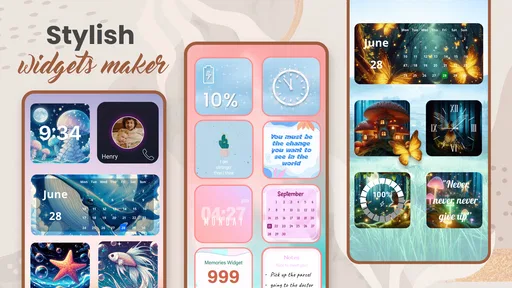
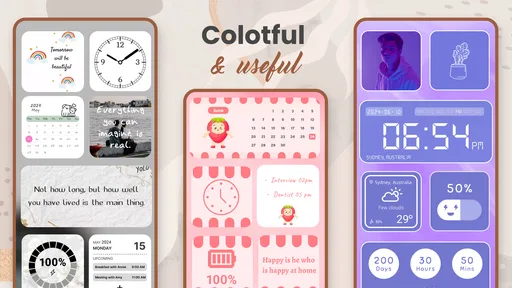
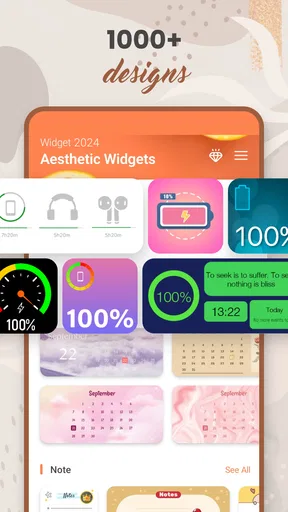
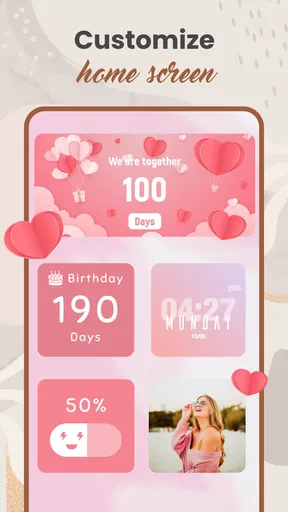
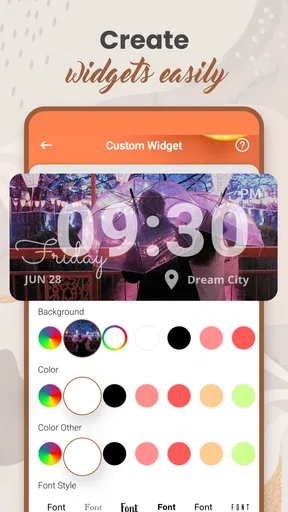
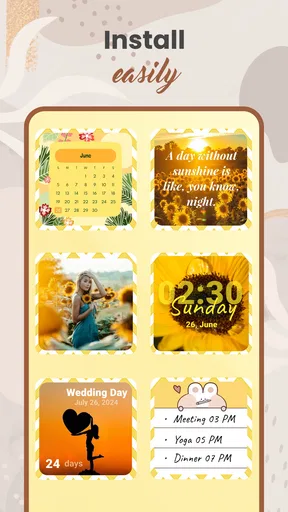
Setting up the widgets is as straightforward as it gets. You simply choose from a variety of pre-designed widgets or customize your own. The customization options are pretty extensive, allowing you to tweak colors, fonts, and even add your own photos. Whether you want something minimalistic or vibrant, there's something in here for everyone.
The Aesthetic Game Changer
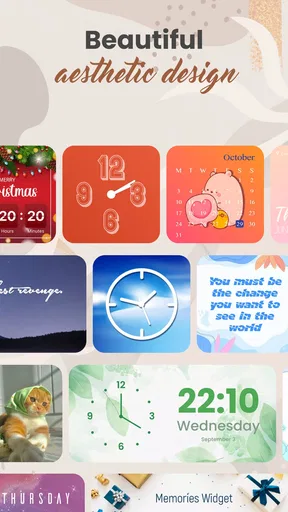
The variety of aesthetic themes available is where this app truly shines. You can opt for a sleek, modern look or go for something more vintage or playful. The themes are crafted with attention to detail, and it’s evident that a lot of thought went into their design.
I was particularly impressed with the seasonal themes. They’re perfect for when you want to switch things up for the holidays or any special occasion. The app updates these themes regularly, keeping your home screen fresh and exciting.
Performance and Efficiency
Now, let’s talk about performance. Nobody wants an app that slows down their phone, and fortunately, Widget 2026 runs smoothly without any noticeable lag. It doesn’t hog your battery life, either, which is a common issue with some other customization apps. I ran multiple widgets simultaneously, and my phone handled it like a champ.
The app also offers a handy battery optimization feature. It ensures that your widgets are running efficiently, without draining unnecessary resources. This feature is a lifesaver for heavy phone users like me who are always on the go.
Integration and Compatibility
Compatibility can often be a dealbreaker, but Widget 2026: Aesthetic Widgets supports a wide range of devices, both Android and iOS. It syncs seamlessly with other apps, ensuring that your widgets display real-time information without a hitch.
I tested it with various apps like calendars and weather, and the integration was flawless. The widgets updated in real-time, providing accurate information at a glance, which is exactly what you want from a widget app.
Community and Support
One aspect that stood out to me was the active user community. The app has a dedicated section where users can share their widget designs and ideas. This community aspect not only helps with inspiration but also provides support if you ever encounter any issues.
The developers are quite responsive, frequently updating the app based on user feedback. It's clear they value their user base, and it’s always reassuring to know that the app is actively maintained and improved upon.
If you're ever in a pinch, the app also includes a detailed FAQ section and tutorials, making troubleshooting a breeze. The support team is just an email away, ready to assist you with any problems.
Choosing a layout that lasts
One small workflow tip I find useful with any widget setup is to build around the information I check most, rather than around a theme alone. I would pick one design, place it where my thumb and eyes naturally go, and live with it before adding more. A striking layout can look great in a preview but feel cluttered once it competes with app icons and notifications. Testing one change at a time makes it easier to tell whether a widget is genuinely helping.
Photos are another area where a little restraint pays off. A personal image can make the home screen feel warm, but a busy photo may reduce the contrast of text or make the whole layout harder to scan. I would choose an image with a simple background if the widget also needs to show information, and reserve more detailed pictures for a purely decorative space. That is a small design decision, but it can make the difference between a screen that looks polished and one that feels noisy.
Free to try, with a spending decision to make
The app is free to install, and optional in-app purchases range from $0.99 to $99.99 per item. That is a wide span, so I would browse the available choices carefully and decide what I actually want before spending. The core question is whether a paid option changes the result enough for your own layout; a one-time burst of enthusiasm can otherwise lead to buying designs you stop using after the first screen refresh.
For a cautious first try, I would begin with the free experience and see whether the customization process fits my habits. There is no need to commit to a complete home-screen makeover on day one. If I were setting up a device for a relative, I would also let them choose the look themselves rather than assuming that a coordinated family style is useful. Personalization works best when the person using the phone likes the result.
Version, device fit, and what to check first
Widget 2026 is currently at version 85.1.4 and requires Android 5.0 or later. It has been available since July 19, 2022, and its broad install base suggests that plenty of people have tried it; the average rating is 4.6 from around 166,000 ratings. Those figures can help set expectations about its reach, but they cannot guarantee that every widget behaves the same on every device or home-screen setup.
Before spending time designing a whole layout, I would check that the app is available for the device I plan to use and try one widget in place. The confirmed minimum operating-system requirement is for Android, so I would not assume that the same compatibility details apply to another platform. If the first widget does not appear as expected, I would check the phone’s normal home-screen widget flow and the relevant source app, rather than immediately rebuilding the design from scratch.
Household verdict
With more than 10 million installs and an Everyone age rating, Widget 2026 has broad appeal, but I would still treat it as a personal styling tool rather than a household management solution. Its strongest use is making a familiar phone screen feel more intentional, whether that means a seasonal refresh, a favorite photo, or a tidier glance at routine information. It is free to start, though purchases are available, so I would explore before deciding whether any extras are worth paying for.
For a household that shares devices or calendars, the best approach is to settle account access and privacy first, then use a widget only where a quick glance genuinely helps. I would recommend the app to someone who enjoys customizing a screen and wants more visual choice than a default layout provides. I would steer a person seeking shared schedules, strict account boundaries, or a zero-maintenance setup toward the tools already built for those jobs. That distinction is the key to getting something useful from it without expecting a decorative app to solve a coordination problem.
Final Thoughts
In conclusion, Widget 2026: Aesthetic Widgets is a fantastic choice for anyone looking to add a personal touch to their smartphone. Its ease of use, impressive aesthetic options, and strong performance make it stand out in the crowded market of customization apps.
Whether you're a customization veteran or a first-timer, this app has something to offer. It’s a delightful way to express your style right from your phone's home screen. So, if you're in the mood for a little smartphone makeover, give it a whirl. You might just find yourself spending more time admiring your screen than ever before!
Pros
- Highly customizable widget designs.
- User-friendly interface and setup.
- Regular updates with new features.
- Compatible with most devices.
- Minimal impact on battery life.
Cons
- Limited free features available.
- Occasional app crashes reported.
- Some features require in-app purchases.
- Ads can be intrusive at times.
- No offline functionality available.
FAQs for Widget 2026: Aesthetic Widgets
What are the main features of Widget 2026: Aesthetic Widgets?
Widget 2026 offers customizable widgets that enhance your home screen's appearance and functionality. Users can choose from a variety of designs, colors, and formats to match their personal style. The app includes options for weather updates, calendar events, and quick access to popular apps, all while maintaining a sleek and modern aesthetic.
Is Widget 2026 compatible with both Android and iOS devices?
Yes, Widget 2026 is designed to be compatible with both Android and iOS devices. The app is optimized for different screen sizes and operating systems, ensuring a smooth user experience across platforms. Regular updates are provided to maintain compatibility with the latest OS versions.
Are there any in-app purchases or subscription fees in Widget 2026?
Widget 2026 offers a free version with basic features, but users can access premium widgets and customization options through in-app purchases or a subscription model. The premium version unlocks exclusive themes, advanced widget functionalities, and removes ads for an enhanced user experience.
How easy is it to customize widgets in Widget 2026?
Customizing widgets in Widget 2026 is straightforward and user-friendly. The app provides an intuitive interface where users can drag and drop elements, adjust sizes, and select colors. Detailed tutorials and customer support are available to assist users in creating their ideal widget setups quickly and easily.
Does Widget 2026 affect my device's performance or battery life?
Widget 2026 is designed to be efficient and lightweight, minimizing its impact on device performance and battery life. The app employs advanced optimization techniques to ensure that it runs smoothly without draining your battery, allowing users to enjoy aesthetically pleasing widgets without compromising device functionality.


